
Project Implementation Plan: Steps, Example & Free Template
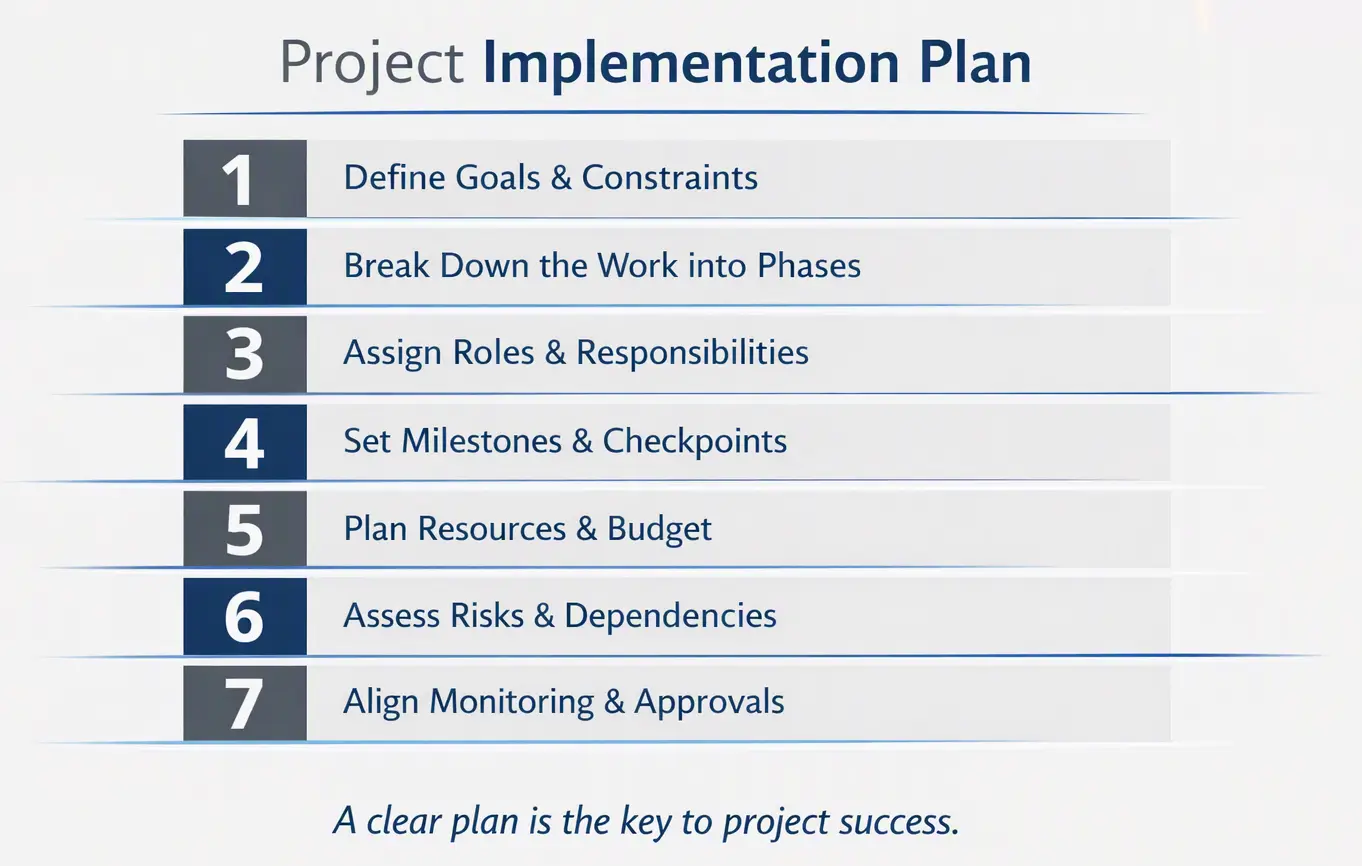
Table of Contents
Definition
Project Implementation Plan
A project implementation plan is the document that explains how an approved project will be carried out: the phases, deliverables, owners, resources, risks, and the milestones that show progress. Its time part, the project implementation schedule, places those phases and milestones on a single timeline.
A project implementation plan picks up where approval leaves off. The business case says why the project is worth doing and the charter says who is in charge. The implementation plan answers the next question every sponsor asks: “So how exactly are we going to do this, and when will I see results?” A good one fits on a few pages, names a person for every piece of work, and gives the team a project implementation schedule they can check progress against every week.
This guide covers what the plan contains, how it differs from the project plan and the detailed schedule, how to build one in seven steps, and a worked example from a CRM rollout. At the end you will find a free Word template that follows the same structure.
Key Takeaways
- An implementation plan turns an approved project into phases, deliverables, owners, and milestones. It is written after approval and before execution starts.
- It is not the same as the detailed project schedule. The plan works at the level of phases and milestones; the schedule breaks them into activities with durations and dependencies.
- Every milestone needs one named owner and a clear acceptance criterion. A date alone is not a milestone.
- The plan is a living document. It gets reviewed at each milestone and updated through change control, not quietly rewritten.
- Start from the free implementation plan template below, or check what you remember with the 10-question quiz.
What Is a Project Implementation Plan?
An implementation plan for a project is a description of the actions that will take it from approval to finished deliverables: what will be done, in what order, by whom, with what resources, and how progress will be checked. Some organizations call it an execution plan, a delivery plan, or a project management implementation plan. The name matters less than the content.
Project implementation itself is the phase in which the planned work actually happens: the team builds, installs, trains, migrates, and hands over. The implementation plan is written just before that phase starts. In a typical sequence, the business case justifies the project, the project charter authorizes it, and the implementation plan explains how the authorized project will be delivered.
The plan serves three groups of readers at once:
- The sponsor and steering committee use it to see that delivery has been thought through and to know which milestones they will be asked to approve.
- The project team uses it to understand their part of the work, who they depend on, and what “done” means for each deliverable.
- The people affected by the project, such as end users, operations, and support, use it to prepare for the moments when the change reaches them.
The project manager owns the document and writes most of it, with input from workstream leads. The sponsor approves it. The same structure works outside classic projects too: an organization rolling out a new strategy or policy writes an implementation plan with the same parts, just with different words for the phases.
Implementation Plan vs. Project Plan vs. Implementation Schedule
These three documents overlap, and on small projects they are often merged into one. On anything larger it helps to keep them apart, because each answers a different question and is read by different people.
| Project management plan | Implementation plan | Implementation schedule | |
|---|---|---|---|
| Main question | How will this project be managed? | How will the work be delivered? | When will each phase and milestone happen? |
| Level of detail | Policies and subsidiary plans (scope, cost, quality, risk, communication) | Phases, deliverables, owners, resources, milestones | Phases and milestones on a timeline, with key dependencies |
| Main readers | PMO, sponsor, auditors | Sponsor, team leads, affected departments | Everyone, often as a one-page chart |
| Feeds into | All project controls | The detailed project schedule and work packages | Status reports and steering committee reviews |
The detailed project schedule sits one level below all three. It lists individual activities with durations, dependencies, and resources, and it is the tool the team uses day to day. The implementation schedule is its summary: the view a sponsor needs, without the 300 rows. For more on how the overall project management plan is put together, see our separate guide.
What to Include in an Implementation Plan
The sections below follow our Project Implementation Guide, where each one has its own detailed chapter. A small project may cover a section in two sentences; a large one may need several pages for it. Skip a section only when you are sure it does not apply, not because it is hard to write.
- Background. Why the project exists and what happened before it. Two or three paragraphs are usually enough. See how to write a project background.
- Objectives. What the project must achieve, written so that someone can check later whether it did. See project objectives.
- Benefits. The measurable gains the organization expects and who will track them after the project closes.
- Governance. Who sponsors, who decides, who escalates to whom, and how often the steering committee meets.
- Scope and deliverables. What is in, what is out, and what each deliverable must look like to be accepted. The scope statement is the source.
- Phases and implementation schedule. The major phases, their milestones, and how they depend on each other. More on this below.
- Work breakdown. How each deliverable splits into manageable pieces of work. See developing a work breakdown structure.
- Roles and responsibilities. Who does, approves, and is consulted on each deliverable, usually as a RACI table.
- Resources and budget. People, equipment, and money by phase. See determining the project budget.
- Procurement. What will be bought or contracted, and by when it must be in place. See project procurement management.
- Stakeholders and communication. Who needs to hear what, how, and how often. See our stakeholder management guide.
- Risks and dependencies. The main threats to the plan, their owners, and the responses agreed in advance. See the risk management plan.
- Quality and acceptance. How deliverables will be tested and who signs them off.
- Monitoring, reporting, and change control. Which status reports go to whom, which numbers they show, and how changes to the plan get approved.
How to Create a Project Implementation Plan in 7 Steps
Project implementation planning works best as a short series of working sessions with the people who will do the work, not as a document the project manager writes alone over a weekend. Plan for one to three weeks on a medium-sized project.
Step 1. Confirm Objectives, Scope, and Constraints
Start from the approved business case and charter. Restate the objectives in measurable terms, list what is in and out of scope, and write down the fixed constraints: the deadline that cannot move, the budget ceiling, the systems or people you cannot touch. If anything here is unclear, resolve it with the sponsor now. Every later step builds on it.
Step 2. Break the Work Into Phases and Deliverables
Split the project into four to eight phases, each ending with something you can show or test. For each phase, list its deliverables and break the larger ones into work packages. Phases can overlap, but every phase should have a clear finish line. “Configuration” is a phase name; “CRM configured and system test passed” is a finish line.
Step 3. Set Milestones and Build the Implementation Schedule
Put a milestone at the end of each phase and at every point where someone outside the team must approve something. Give each milestone a date, one owner, and an acceptance criterion. Then lay the phases and milestones on a timeline, mark the dependencies between them, and add a buffer before any date the business cannot move. Check the result against the detailed schedule if one already exists; the two must agree.
From the field
Day One Without a Network
Years ago I ran the move of a 40-person regional office into a new building. The implementation plan looked great. Lease signed, furniture ordered, phones booked, and a neat milestone in week six: “Network ready.” It had a date. It did not have a name next to it.
IT thought facilities had ordered the internet line. Facilities thought IT had. The provider, of course, was waiting for an order from somebody. We found out on the Wednesday before the move, when I asked who was coming to test the connection. Silence. Then a lot of phone calls.
For the first week, forty people worked from the coffee shop downstairs and their phone hotspots. Nobody was fired, but I never wrote another milestone without a person’s name on it. Not a department. A person.

Eric Morkovich, PMP
Project manager and long-time MyManagementGuide contributor
Step 4. Assign Roles and Responsibilities
For each deliverable and milestone, decide who is Responsible for doing the work, who is Accountable for signing it off, who must be Consulted, and who only needs to be Informed. A RACI table makes gaps visible fast: a row with no A means nobody will approve it, and a row with three As means nobody really will either.
Step 5. Plan Resources and Budget
Estimate the people, equipment, licenses, and contractors each phase needs, and when. Pay special attention to people who keep their day jobs during the project. A sales manager who is “50% on the project” in the plan is often 10% on it in reality during quarter-end. Write the assumption down so it can be checked. Then set the budget by phase, with a contingency reserve held by the sponsor or project manager.
Step 6. Identify Risks and Dependencies
List the events that could break the plan: a late vendor, poor data quality, a key person leaving, a regulatory approval that takes longer than expected. Give each one an owner and a planned response. Do the same for external dependencies, the things the project needs but does not control. Put the top five on the first page of the plan, where the sponsor will actually read them.
Step 7. Define Monitoring and Get the Plan Approved
Decide how progress will be tracked: which status report goes to whom, how often, and which numbers it shows (milestones hit, budget spent, open risks). Agree how changes to the plan will be requested and approved. Then walk the sponsor and key stakeholders through the plan, fix what they find, and get a formal sign-off. The approved version becomes the baseline you will control the project against.
The Implementation Schedule: Phases, Milestones, and Dependencies
The project implementation schedule is the part of the plan most people actually look at. It places the phases of the project on one timeline from approval to handover, so anyone can see what happens when and which phases overlap. It also becomes the framework for the detailed schedule and for the work breakdown structure, because every activity added later has to fit inside one of its phases.
A clear implementation schedule shows six things:
- Phases. The number of phases and a one-line description of each. A phase is a portion of work defined by its deliverables and its time frame.
- Deliverables per phase. What each phase must produce before it can be called complete.
- Major activities. The few large blocks of work inside each phase. The detail lives in the project schedule, not here.
- Key milestones. The checkpoints where progress is verified and, often, where the steering committee makes a go or no-go decision.
- Responsibilities. Who owns each phase and each milestone.
- Dependencies. Which phases cannot start, or cannot finish, until another phase delivers something. These links decide where the schedule can flex and where it cannot.
The longest chain of dependent phases sets the earliest possible finish date. That chain is the critical path, and a delay anywhere on it delays the whole project. A Gantt chart is the usual format, but a simple table works too, as in the example below. If you need a quick structure for listing activities first, our activity schedule template helps.
Project Implementation Plan Example
Here is a condensed implementation plan example. A mid-sized distribution company is replacing spreadsheets and an old contact database with a cloud CRM for 85 sales reps in three offices: Chicago, Denver, and Atlanta. The project is approved with a 16-week window, and the sponsor is the VP of Sales.
Objectives: all three offices working in the CRM by week 15; legacy database switched to read-only by week 16; at least 95% of active customer records migrated and reconciled; every rep trained before their office goes live.
| Phase | Weeks | Key deliverables | Milestone (owner) |
|---|---|---|---|
| 1. Mobilize and plan | 1-2 | Approved implementation plan, RACI, detailed schedule | M1: Plan signed off (project manager) |
| 2. Configure and integrate | 3-7 | Configured CRM, ERP integration, migration scripts | M2: System test passed (CRM lead) |
| 3. Data migration and UAT | 8-10 | Cleaned data loaded, user acceptance test results | M3: UAT sign-off (sales operations manager) |
| 4. Training | 9-11 | Training materials, sessions for all 85 reps | M4: All reps trained (training lead) |
| 5. Pilot go-live, Chicago | 12-13 | Chicago office live, two weeks of hypercare | M5: Pilot go/no-go decision (VP of Sales) |
| 6. Rollout, Denver and Atlanta | 14-15 | Both offices live | M6: All offices live (project manager) |
| 7. Close and hand over | 16 | Legacy system read-only, support handover, lessons learned | M7: Project closed (VP of Sales) |
Dependencies: training (phase 4) cannot start until the system test passes in week 7, because the materials need real screens. The Chicago pilot cannot start until UAT is signed off. Denver and Atlanta go live only after the steering committee reviews the pilot results at M5.
Top risks and responses:
- Poor data quality in the legacy database. Response: start a cleanup in week 3, run a test migration in week 6, and agree with sales operations which records can be archived instead of migrated.
- ERP integration delayed by the ERP vendor. Response: book the vendor’s time in week 1 and keep a manual export as a fallback for the pilot.
- Reps too busy to adopt the new tool. Response: no go-live in the last two weeks of a sales quarter, and team leads trained first so they can coach their people.
Go-live criteria for each office: no open critical defects, migrated records reconciled for that office, every rep in the office trained, and the support team briefed on the first-week escalation path.
Expert Tip
Never put a go-live on a Friday or in the last week of a quarter. And plan two weeks of hypercare after every cutover, where the project team, not the help desk, owns every ticket. It costs a little budget and buys a lot of trust from the users.
 Daniel Linman, IT software consultant
Common Implementation Planning Mistakes
- Milestones without owners. A department is not an owner. If nobody’s name is next to a milestone, assume nobody will deliver it.
- Milestones without acceptance criteria. “Training complete” invites an argument. “All 85 reps attended and passed the practice exercise” does not.
- No buffer before fixed dates. If the business date cannot move, the plan needs slack in front of it. Otherwise the first delay lands on the date itself.
- Ignoring the team’s day jobs. Plans assume people are available when they are not: quarter-end, audits, peak season, holidays. Check the business calendar before fixing phase dates.
- Planning the build but not the handover. Training, support readiness, and switching off the old system are part of implementation. Leaving them to “after go-live” is how projects drift for months.
- Writing the plan once. A plan that is not reviewed at each milestone stops matching reality within weeks. Update it through change control and keep the approved baseline for comparison.
Free Project Implementation Plan Template
The project implementation plan template follows the structure of this guide and of our Implementation Guide. It includes a one-page summary, sections for background, objectives, scope, and governance, an implementation schedule table with milestones and owners, a RACI table, resource and budget tables, risk and dependency registers, acceptance criteria, a reporting plan, change control, and a sign-off page. Each section has short instructions in gray that you delete as you fill it in.
Once the plan is approved, keep a record of what was actually delivered against it. That record feeds the project evaluation and the lessons learned at closure.
Practice: Test Yourself
10 questions on this guide: what the plan contains, how it differs from the schedule, milestones, dependencies, and the example. Multiple choice, with an explanation after each answer.
Quick Knowledge Check: Project Implementation Plan
10 questions. Takes about 3 minutes.
Frequently Asked Questions
Project implementation is the phase in which the planned work is actually carried out: the team builds, installs, tests, trains users, and hands the result over to the people who will run it. It starts after the project is approved and planned, and it ends when the deliverables are accepted and the project is closed.
They depend on the project, but most implementations follow a similar pattern: mobilize and plan, build or configure, test, prepare users through training and communication, go live (often with a pilot first), and close with handover and lessons learned. The implementation schedule names the phases for your specific project.
The project management plan describes how the project will be managed: its policies for scope, cost, quality, risk, and communication. The implementation plan describes how the work will be delivered: phases, deliverables, owners, resources, and milestones. On small projects the two are often combined into one document.
The project manager prepares it, working with the leads of each workstream, who know how long their work really takes. Finance, procurement, and operations usually review the relevant sections. The sponsor, or the steering committee on larger projects, approves the final version.
Detailed enough that a sponsor can see every phase, milestone, and owner on one page, and no more. Individual activities, durations, and resource assignments belong in the detailed project schedule. If your implementation schedule runs to several pages, move the detail down a level.
Yes. Organizations write implementation plans for strategies, policies, and process changes that are not run as formal projects. The structure stays the same: objectives, actions, owners, resources, timeline, risks, and how progress will be measured. Only the vocabulary changes, for example “initiatives” instead of “phases.”