Table of Contents
Definition
Critical Path
The critical path in project management is the longest sequence of dependent activities from the start of a project to its finish. Its length is the shortest time in which the project can be completed. Activities on the critical path have zero float, so a delay to any of them delays the whole project.
Every project schedule has a chain of work that decides the finish date. Speed up anything else and the project still ends on the same day. Let one link of that chain slip and the end date moves with it. That chain is the critical path, and knowing where it runs tells a project manager where attention, people, and money actually change the outcome.
This guide explains what the critical path is, the terms you need to calculate it, and how to find it in six steps. It then works through a full example, the launch of an online store, and gives you a free calculator that does the forward and backward pass for your own project.
Key Takeaways
- The critical path is the longest chain of dependent activities. It is about duration and dependencies, not about which tasks are the most important or the hardest.
- Its length is the earliest possible finish date. Any delay on it moves the end of the project by the same amount, unless you change the plan.
- You find it with a forward pass (earliest dates), a backward pass (latest dates), and a float check. Activities with zero total float are critical.
- Finishing non-critical work early does not bring the finish date closer. Only shortening critical activities does.
- A project can have more than one critical path, and the path can move during the project when activities finish early or late.
What Is the Critical Path in Project Management?
A project is a set of activities, and many of them cannot start until others finish. Testing waits for the build; training waits for the system to be configured. If you trace every possible chain of such dependencies from the first activity to the last, one chain will take longer than all the others. That longest chain is the critical path, and its total duration is the minimum time the project needs.
The activities on that chain are called critical activities. They have no room to slip: if one of them takes two extra days, the project finishes two days later. Activities off the critical path have some spare time, called float or slack. They can start later or run longer, up to a limit, without affecting the finish date.
The critical path method (CPM) is the technique used to find that chain. It was developed in the late 1950s by Morgan Walker of DuPont and James Kelley of Remington Rand to plan plant construction and maintenance work. Around the same time, the U.S. Navy developed PERT for the Polaris missile program. Both methods remain the basis of scheduling in tools such as MS Project, Primavera, and most modern project software.
Why the Critical Path Matters
- It gives a realistic finish date. The date comes from the logic of the work, not from a wish or a deadline set by someone else.
- It shows where to focus. A project manager cannot watch 200 activities with the same care. The critical ones deserve the closest monitoring and the first call on scarce people.
- It shows where you have flexibility. Activities with float can be moved to level resources or absorb small delays without anyone outside the team noticing.
- It makes delays measurable. When something slips, you can tell at once whether the finish date is at risk and by how much.
Key Terms: ES, EF, LS, LF, Float
Critical path analysis uses four dates for each activity and two kinds of float. You will see them in every scheduling tool, so it is worth knowing exactly what each one means.
| Term | Meaning | How it is calculated |
|---|---|---|
| ES (Early Start) | The earliest an activity can start | The largest EF among its predecessors (0 for the first activity) |
| EF (Early Finish) | The earliest an activity can finish | ES + duration |
| LS (Late Start) | The latest an activity can start without delaying the project | LF minus duration |
| LF (Late Finish) | The latest an activity can finish without delaying the project | The smallest LS among its successors (the project finish date for the last activity) |
| Total float | How long an activity can slip without delaying the project | LS minus ES (or LF minus EF) |
| Free float | How long an activity can slip without delaying the next activity | The earliest ES among its successors minus its own EF |
Two other terms come up often. A predecessor is an activity that must finish before another can start, and a successor is the activity that waits for it. Most dependencies are finish-to-start, which is the type this guide uses. Tools also support start-to-start, finish-to-finish, and lags (a fixed wait between two activities, such as concrete curing time), but the logic of the calculation is the same.
A note on counting: this guide counts time from zero, so an activity with ES 3 starts after three days have passed. Some textbooks start on day 1 and add or subtract one day in the formulas. Both conventions give the same critical path; just do not mix them in one schedule.
How to Find the Critical Path in 6 Steps
1. List the activities
Start from the work breakdown structure and list the activities needed to produce each deliverable. Give each one a short ID. Keep them at a level where one person or team owns the work and you can estimate its duration; ten to fifty activities is a manageable range for a first pass.
2. Define the dependencies
For each activity, ask: what must be finished before this can start? Write down only real constraints, the ones caused by the work itself, by a supplier, or by an approval. Dependencies that exist only out of habit make the critical path longer than it needs to be.
3. Estimate durations
Estimate how long each activity will take, in working days or weeks. Ask the people who will do the work, and use past projects where you have them. For uncertain activities, a three-point estimate (optimistic, most likely, pessimistic) gives a more honest number. Our guide to project activities planning and scheduling covers estimation in more detail.
4. Draw the network diagram
Draw each activity as a box and connect boxes with arrows from predecessor to successor. This activity-on-node layout makes every possible path from start to finish visible, and it is how you spot missing or circular dependencies before you calculate anything.
5. Run the forward and backward pass
The forward pass moves from left to right and calculates the earliest dates: each activity’s ES is the latest EF among its predecessors, and EF is ES plus duration. The largest EF in the network is the project duration. The backward pass moves from right to left, starting from that duration, and calculates the latest dates: each activity’s LF is the earliest LS among its successors, and LS is LF minus duration.
6. Calculate float and mark the critical path
Subtract ES from LS for every activity. The activities with zero total float form the critical path. Check that they connect from the first activity to the last; if they do not, there is an error in the dependencies or the arithmetic. Then mark the path on your diagram and in your scheduling tool, so everyone on the team can see it.
Critical Path Example: Launching an Online Store
The clearest way to understand the critical path is to see it work on a real project. The example below starts with a case from IT software consultant Daniel Linman and then turns it into numbers you can calculate step by step.
From the field
Everything Was Ready Except Payments
I once worked with a team that was getting ready to launch an online store. The designers finished the banners early, the product descriptions were uploaded, and the ad campaigns were set up. On paper we were ahead of schedule. But the store could not take a single order: the payment provider was still reviewing the company’s documents. Until it approved them, the developers could not finish connecting the payment gateway or test checkout.
The review took three days longer than expected, and the launch moved by the same three days. The finished banners and texts could not make up for it. Our critical path was payment provider approval, then gateway connection, then checkout testing, then launch. That was the longest chain of dependent work, and it set the earliest date the store could open. Everything else was needed too, but it had time to spare.
What the team took from it: to finish a project sooner, getting more tasks done is not enough. You have to shorten the work the finish date depends on.

Daniel Linman
IT Software Consultant, Canada
The activities
Here is the same kind of launch as a schedule. The durations are illustrative, in working days, but the structure follows the case.
| ID | Activity | Duration (days) | Predecessors |
|---|---|---|---|
| A | Finalize scope and product list | 3 | None |
| B | Design the store theme | 4 | A |
| C | Prepare product data and photos | 6 | A |
| D | Payment provider verification | 8 | A |
| E | Build store pages | 3 | B |
| F | Connect payment gateway | 3 | D |
| G | Import products into the store | 2 | C |
| H | Test checkout and orders | 3 | F, G |
| I | Launch the store | 1 | E, H |
Forward pass: earliest dates
- A has no predecessors: ES 0, EF 0 + 3 = 3.
- B, C, D all wait for A, so each starts at 3. B finishes at 7, C at 9, D at 11.
- E follows B: 7 to 10. G follows C: 9 to 11. F follows D: 11 to 14.
- H waits for both F (14) and G (11). It takes the later one, so ES is 14 and EF is 17.
- I waits for E (10) and H (17), so it runs from 17 to 18. The project takes 18 days.
Backward pass: latest dates
- I must finish by 18, so it must start by 17.
- H and E must finish by 17. H must start by 14; E must start by 14.
- F and G must finish by 14 (when H must start). F must start by 11; G must start by 12.
- D must finish by 11 and start by 3. C must finish by 12 and start by 6. B must finish by 14 and start by 10.
- A must finish by the earliest of those late starts, which is 3 (from D), so it must start at 0.
Float and the critical path
| ID | ES | EF | LS | LF | Total float | Free float | Critical? |
|---|---|---|---|---|---|---|---|
| A | 0 | 3 | 0 | 3 | 0 | 0 | Yes |
| B | 3 | 7 | 10 | 14 | 7 | 0 | No |
| C | 3 | 9 | 6 | 12 | 3 | 0 | No |
| D | 3 | 11 | 3 | 11 | 0 | 0 | Yes |
| E | 7 | 10 | 14 | 17 | 7 | 7 | No |
| F | 11 | 14 | 11 | 14 | 0 | 0 | Yes |
| G | 9 | 11 | 12 | 14 | 3 | 3 | No |
| H | 14 | 17 | 14 | 17 | 0 | 0 | Yes |
| I | 17 | 18 | 17 | 18 | 0 | 0 | Yes |
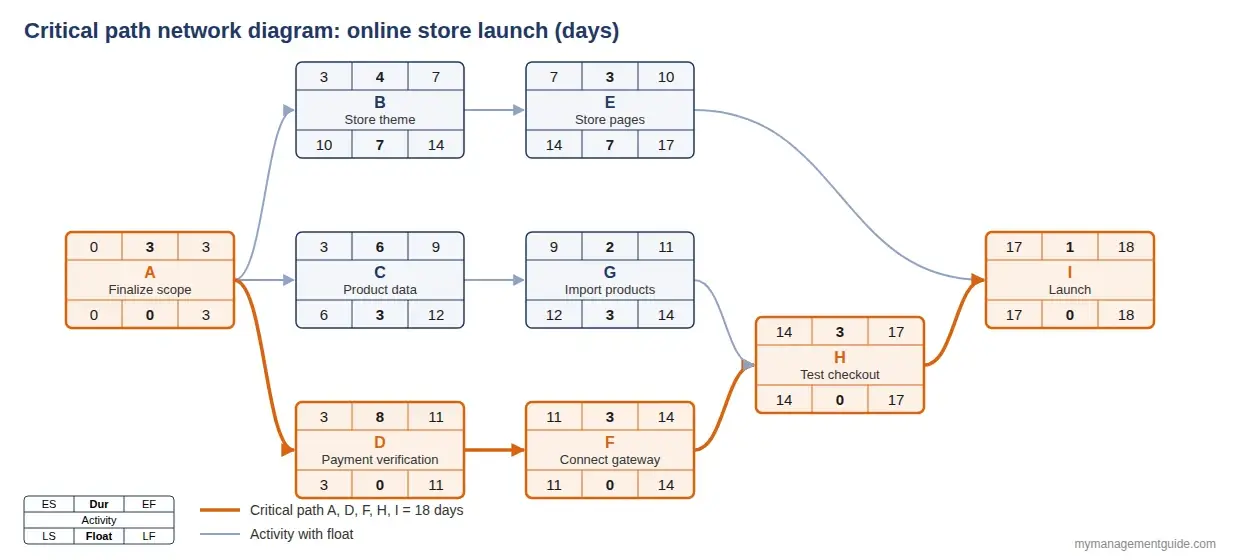
The critical path is A, D, F, H, I: scope, payment verification, gateway connection, testing, launch. It adds up to 3 + 8 + 3 + 3 + 1 = 18 days, the longest of the three paths through the network. The other two paths, through the store design (A, B, E, I: 11 days) and through the product catalog (A, C, G, H, I: 15 days), have 7 and 3 days of float.
Look at activity B. It has 7 days of total float but no free float. If the theme design runs late, building the store pages starts late too, although the launch is still safe for up to 7 days. That difference matters when B and E are owned by different people: a delay that is harmless for the project can still eat into someone else’s week.
Now replay the case. If payment verification takes 11 days instead of 8, every later critical activity moves by 3 days and the launch moves from day 18 to day 21. If instead the store design finishes 2 days early, nothing changes: the launch is still on day 18. That is the whole lesson of the case in numbers.
Critical Path Calculator
Use the calculator below to find the critical path of your own project. Enter an ID, a name, a duration, and the IDs of the predecessors for each activity. The results update as you type: project duration, the critical path (or paths), ES, EF, LS, LF, total and free float for every activity, and a simple timeline. It opens with the online store example, so you can try changing the payment verification from 8 to 11 days and watch the launch move.
Critical Path Calculator
Enter your activities, their durations, and what each one waits for. The calculator runs the forward and backward pass, shows the float of every activity, and highlights the critical path. It opens with the online store example from this guide; edit it or clear it and add your own.
| ID | Activity | Duration | Predecessors | Remove |
|---|
The calculator handles finish-to-start dependencies without lags, which covers most planning work. For calendars, resources, and other dependency types, move the result into your scheduling tool.
Critical Path on a Network Diagram and a Gantt Chart
The network diagram is where the critical path is calculated and explained. Each box shows the four dates and the float, and the critical chain is drawn in a different color. It answers the question “why does the project take this long?” better than any other view.
The Gantt chart is where the critical path is managed day to day. Bars are placed on a calendar, critical bars are usually shown in red or orange, and float appears as a thin line after non-critical bars. MS Project, Smartsheet, Primavera, and most other tools calculate and highlight the critical path automatically once dependencies are entered. In Excel you have to build the calculation yourself, which is why a small calculator like the one above is often faster for a first check.
Critical Path Software: 6 Tools That Calculate It for You
Once a schedule grows past a few dozen activities, or starts changing every week, calculating the critical path by hand stops being practical. Most scheduling tools run the forward and backward pass automatically as soon as you enter durations and dependencies. Here are six options, from enterprise tools to free desktop apps.
| Tool | Type and price | How it shows the critical path | Best for |
|---|---|---|---|
| Microsoft Project | Desktop, paid | The Detail Gantt view shows critical tasks in red and total slack as a thin line after each bar. It can also calculate a separate critical path for each independent chain of tasks. | Project managers working in a Microsoft environment, medium and large schedules |
| Oracle Primavera P6 | Enterprise, paid | Marks activities as critical either by the longest path through the network or by a total float threshold you set. | Construction, engineering, and large capital projects with formal scheduling requirements |
| Smartsheet | Cloud, subscription | Highlights critical tasks and milestones in red in the Gantt view once dependencies are turned on, and updates the path as dates change. | Teams that like working in a spreadsheet-style grid |
| TeamGantt | Cloud, subscription | A Critical path button either highlights critical tasks and dims the rest, or filters the plan down to the critical path only. | Small teams that want a simple visual planner |
| ProjectLibre | Desktop, free and open source | Highlights the critical path on the Gantt chart and has a network diagram view. Opens and saves Microsoft Project files. | Anyone who needs MS Project-style scheduling without a license |
| GanttProject | Desktop, free and open source (Windows, macOS, Linux) | Shows the critical path with one click and generates a PERT chart from the Gantt chart. Imports and exports Microsoft Project files. | Students and small projects |
Whichever tool you pick, the result is only as good as the logic you enter. Every activity needs a predecessor and a successor (except the first and last), and fixed dates should be kept to a minimum, because a hard-coded start date hides the real dependency chain. For a quick check before you build the full schedule, the calculator above is often enough.
Multiple and Near-Critical Paths
A project can have more than one critical path. In the example, if preparing the product data took 9 days instead of 6, the content path (A, C, G, H, I) would also reach 18 days, and both chains would have zero float. Two critical paths mean twice the exposure: a delay on either one moves the launch. Try it in the calculator above.
A near-critical path is one with very little float, such as the content path in the original example with only 3 days. It is not critical today, but a small delay will make it so. Experienced planners watch the two or three longest paths, not just the longest one, because the critical path often moves during a project as some activities finish early and others late.
Float can also be negative. This happens when a fixed deadline is earlier than the date the network calculates. If the store had to open on day 15, the critical activities would show 3 days of negative float: the plan is already 3 days short, and something has to change.
How to Shorten the Critical Path
When the calculated finish is later than the business needs, there are two standard techniques, both applied only to critical activities. Shortening anything else has no effect on the finish date.
- Crashing means adding resources to a critical activity to finish it sooner: more people, overtime, a faster supplier, a paid express service. It costs money, so start with the activities that give the most days for the least cost. Our guide to estimating project cost helps price those trade-offs.
- Fast-tracking means doing in parallel what was planned in sequence. In the store example, developers could build the payment integration in the provider’s test mode while verification is still in progress, leaving only the switch to live mode for after approval. Fast-tracking is cheaper than crashing, but it adds risk: if the approved setup differs from what was built, some work has to be redone.
Two more options are often overlooked. You can question the dependency itself (does testing really need all products loaded, or only a few?), and you can start the long, slow external items as early as possible. Approvals, permits, and supplier lead times are often on the critical path precisely because nobody on the team controls their duration.
After any change, recalculate. Shortening the critical path by more than the float of the next-longest path simply makes that other path critical.
CPM vs. PERT vs. Critical Chain
| CPM | PERT | Critical chain (CCPM) | |
|---|---|---|---|
| Durations | One estimate per activity | Three estimates, combined as (O + 4M + P) / 6 | Shortened, aggressive estimates |
| Resources | Not considered in the basic calculation | Not considered | Central: the chain accounts for people who cannot do two things at once |
| Buffers | Float on non-critical activities | Probability of meeting a date | Project and feeding buffers placed at the end of chains |
| Best for | Projects with well-known activity durations | Projects with high uncertainty, such as R&D | Projects where shared resources are the real constraint |
In practice the methods are often combined: three-point estimates feed a CPM schedule, and resource leveling in the scheduling tool adjusts it. For the resource-driven approach in detail, see our article on critical chain project management.
Common Mistakes and Limitations
- Confusing critical with important. The critical path is about time. A high-risk or high-value task with plenty of float is not on it, and a dull approval step may well be.
- Missing dependencies. An activity with no successor, or no predecessor, is usually a mistake. It makes float look larger than it is.
- Forgetting external work. Approvals, deliveries, and third-party reviews belong in the network. In the store case, the critical activity was not done by the team at all.
- Ignoring resources. Basic CPM assumes people are available whenever the logic allows. If one developer is assigned to two parallel critical activities, the real schedule is longer than the calculation shows.
- Calculating once and never again. The critical path changes as work progresses. Update actual dates and recalculate at least at every status review.
- Treating float as free time. Total float is shared by every activity on a path. If the first activity uses it all, the rest of the path becomes critical.
The critical path is one input to the project implementation plan, where phases and milestones are agreed with the sponsor. At the activity level, our activity schedule template gives you a ready layout for durations and dependencies.
Practice: Test Yourself
Eight questions on the critical path, float, and the store example. Multiple choice, with an explanation after each answer.
Quick Knowledge Check: Critical Path
8 questions. Takes about 3 minutes.
Frequently Asked Questions
Yes. When two or more paths through the network have the same longest duration, all of them are critical and all their activities have zero float. This is riskier than a single critical path, because a delay on any of those chains moves the finish date.
Yes, and it often does. When a critical activity finishes early or a non-critical one runs late and uses up its float, a different chain can become the longest. That is why the schedule should be updated with actual dates and recalculated at every status review.
No. The critical path is about time, not importance. It is the longest chain of dependent activities. A risky or valuable task with plenty of float is not critical, while a routine approval with no float can be.
Total float is how long an activity can slip without delaying the project finish. Free float is how long it can slip without delaying the early start of any successor. An activity can have total float but no free float, as the store theme design does in the example.
The critical path considers only activity durations and dependencies. The critical chain, from Eliyahu Goldratt’s critical chain project management, also considers resource limits, uses shorter activity estimates, and protects the finish date with buffers at the end of the chain.
List the activities with their durations and predecessors. Early start is the MAX of the predecessors’ early finish, early finish is early start plus duration, and the latest dates are worked out backward in the same way with MIN. Activities where late start minus early start equals zero are critical. For small projects, the calculator on this page does the same thing without formulas.